Are AI Web Crawlers Indexing Your Site Correctly? - Digital Marketing Agency | Website Design | Development | SEO

Digital Marketing Agency | Website Design | Development | SEO

Raw HTML vs. JavaScript: Are AI Web Crawlers Indexing Your Site Correctly?

Are AI Web Crawlers Indexing Your Site Correctly?

October 9, 2026
For years, web developers have relied on JavaScript to power the modern internet, operating under the assumption that search engines eventually catch up and render the content. But the rise of generative search and answer engines has completely rewritten the rules. Unlike heavy traditional search indexers that dedicate massive computing power to running headless browsers for every page, many AI web crawlers operate under strict efficiency limits—meaning they frequently read only the raw HTML served on the initial request.
If your core content, metadata, and links are locked behind complex client-side rendering, you aren’t just risking a drop in rankings—you might be rendering your entire brand invisible to the fastest-growing search channel on the web. Ensuring that your architecture bridges the gap between dynamic user experiences and indexable raw markup is no longer just a technical preference; it is a fundamental requirement for digital survival.
Don’t let invisible rendering issues keep your website out of the next generation of AI search summaries and answer engines. Nexstair Technologies provides advanced AI-driven SEO audits and technical diagnostics that instantly reveal how search crawlers actually see your site, helping you optimize your markup, fix hidden bottlenecks, and secure your brand’s authority. Visit Nexstair Today to uncover what your current analytics might be missing.

Raw HTML vs. JavaScript: Are AI Web Crawlers Indexing Your Site Correctly?

If you’ve spent the last decade building modern web applications with React, Vue, Next.js, or Angular, you’ve likely operated under a comforting assumption: Search engines handle JavaScript just fine.
For traditional SEO, that is mostly true. Googlebot has evolved a two-step rendering queue that parses raw HTML, eventually spins up a headless browser to execute JavaScript, and indexes the resulting DOM.
However, the rules of visibility have fundamentally changed. With the explosive growth of AI-driven search engines, LLM answer engines, and autonomous agents (like ChatGPT, Claude, and Perplexity), a new visibility crisis has emerged.
Are AI web crawlers actually reading your site, or are they walking away with a blank page? Let’s break down the technical reality of Raw HTML vs. JavaScript in the age of Generative Engine Optimization (GEO).

The Core Problem: AI Crawlers Aren’t Web Browsers

When a human user visits your site, their browser downloads the initial HTML shell, fires up the JavaScript, fetches API data, and renders a rich, interactive masterpiece.
When Googlebot visits your site, it goes through a similar (though heavily resource-managed) rendering process.
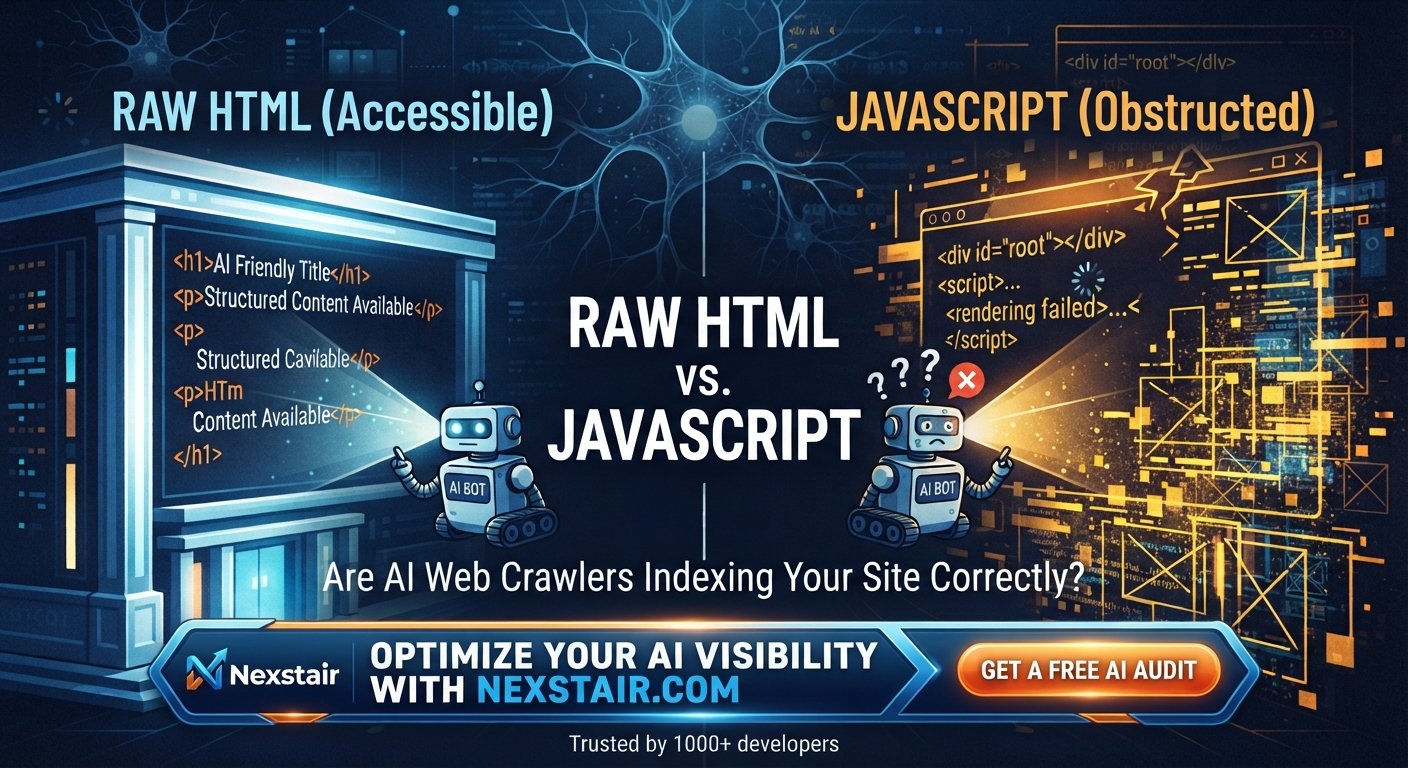
When an AI web crawler (like OpenAI’s GPTbot, Anthropic’s claudebot, or perplexitybot) visits your site, things look very different:
  1. They send a GET request for your URL.
  2. Your server responds with the raw HTML document.
  3. They stop right there.
Studies and infrastructure analyses show that a vast majority of AI web crawlers do not execute client-side JavaScript. Running full browser engines to render JavaScript for billions of pages is computationally heavy and expensive. To optimize for scale and speed, AI crawlers rely almost exclusively on the initial raw HTML response.

What Happens If Your Content Depends on JavaScript?

If your critical content—product prices, specifications, core blog text, category introductions, or FAQ sections is generated dynamically via client-side JavaScript or fetched asynchronously via an API after the page loads, it is invisible to most AI crawlers. Your users see a fully realized, beautiful product page. The AI web crawler sees an empty container div and a script tag it cannot run. Consequently, your brand, features, and pricing are left out of AI-generated answers entirely.

How to Check Your Site Through AI’s Eyes

You don’t need complex enterprise software to check if you’re affected, though you do need to look past your browser’s developer tools. Try this manual audit:
  1. Disable JavaScript: Open a page in your browser, disable JavaScript via your developer tools or an extension, and hard-refresh the page.
  2. View Raw Source: Right-click and select “View Page Source” (do not use “Inspect Element,” which shows the rendered DOM).
  3. Compare Content: Ask yourself: Is the primary text, pricing, or product description present in that raw text? If the text disappears or turns into an empty shell, your site has an AI visibility gap.

Best Practices to Future-Proof Your Site for AI Search

You don’t need to abandon modern JavaScript frameworks to win at AI search, but you do need to adapt your architecture:
  • Implement Server-Side Rendering (SSR) or Static Site Generation (SSG): Frameworks like Next.js, Nuxt, or Remix allow you to render the core content on the server so that the initial HTML payload delivered to any crawler is already fully populated.
  • Adopt Progressive Enhancement: Build your site with a robust HTML foundation first, then use JavaScript to layer on interactivity—rather than relying on JavaScript to build the page from scratch.
  • Leverage Structured Data: Use clean JSON-LD schema markup embedded directly in the raw HTML head/body. This gives AI bots a machine-readable summary of your products, articles, and pricing without requiring them to parse deep UI trees.
  • Audit Your robot.txt and Server Logs: Ensure you aren’t accidentally blocking valuable AI agents, and regularly review server logs to see which bots are successfully requesting your static assets versus bouncing off empty templates.

How Nexstair Technologies Can Help Ensure Your Content is Indexed for AI Web Crawlers

For years, web developers have relied on JavaScript to power the modern internet, operating under the assumption that search engines eventually catch up and render the content. But the rise of generative search and answer engines has completely rewritten the rules. Unlike heavy traditional search indexers that dedicate massive computing power to running headless browsers for every page, many AI web crawlers operate under strict efficiency limits, meaning they frequently read only the raw HTML served on the initial request.

If your core content, metadata, and links are locked behind complex client-side rendering, you aren’t just risking a drop in rankings—you might be rendering your entire brand invisible to the fastest-growing search channel on the web. Ensuring that your architecture bridges the gap between dynamic user experiences and indexable raw markup is no longer just a technical preference; it is a fundamental requirement for digital survival.

Don’t let invisible rendering issues keep your website out of the next generation of AI search summaries and answer engines. Nexstair Technologies provides advanced AI-driven SEO audits and technical diagnostics that instantly reveal how search crawlers actually see your site, helping you optimize your markup, fix hidden bottlenecks, and secure your brand’s authority.

Final Thoughts | Are AI Web Crawlers Indexing Your Site Correctly?

Traditional SEO taught us to build for browsers and trust that search engines would figure out the rest. Generative Engine Optimization (GEO) requires a shift in perspective. If AI models cannot read your raw HTML, they cannot cite your brand, recommend your products, or send you valuable referral traffic. By balancing rich client-side interactivity with server-rendered foundations, you can keep your human users thrilled while ensuring AI crawlers never miss a word. Visit Nexstair Technologies Today to uncover what your current analytics might be missing.

Related Posts

Raw HTML vs. JavaScript: Are AI Web Crawlers Indexing Your Site Correctly?

Are AI Web Crawlers Indexing Your Site Correctly?

For years, web developers have relied on JavaScript to power the modern internet, operating under the assumption that search engines...

choosing a CMS for business

How to Choose the Right CMS for Your Business Website

Choosing a CMS for business use is an architectural decision, not a design decision, even though most business owners approach...

How to Manage Social Media Marketing for Small Business

How to Manage Social Media Marketing for Small Business

Learn how to manage social media marketing for small business effectively & proven strategies, planning tips, and tools to grow...

custom website cost

How Much Does a Custom Website Cost in 2026

Ask five agencies what a custom website costs and you’ll get five different numbers, and none of them will be...

Shopify vs WooCommerce

Shopify vs WooCommerce: Choosing the Right Ecommerce Platform

  Choosing an ecommerce platform is one of those silent factors that can impact your monthly costs, your developer's pain,...