
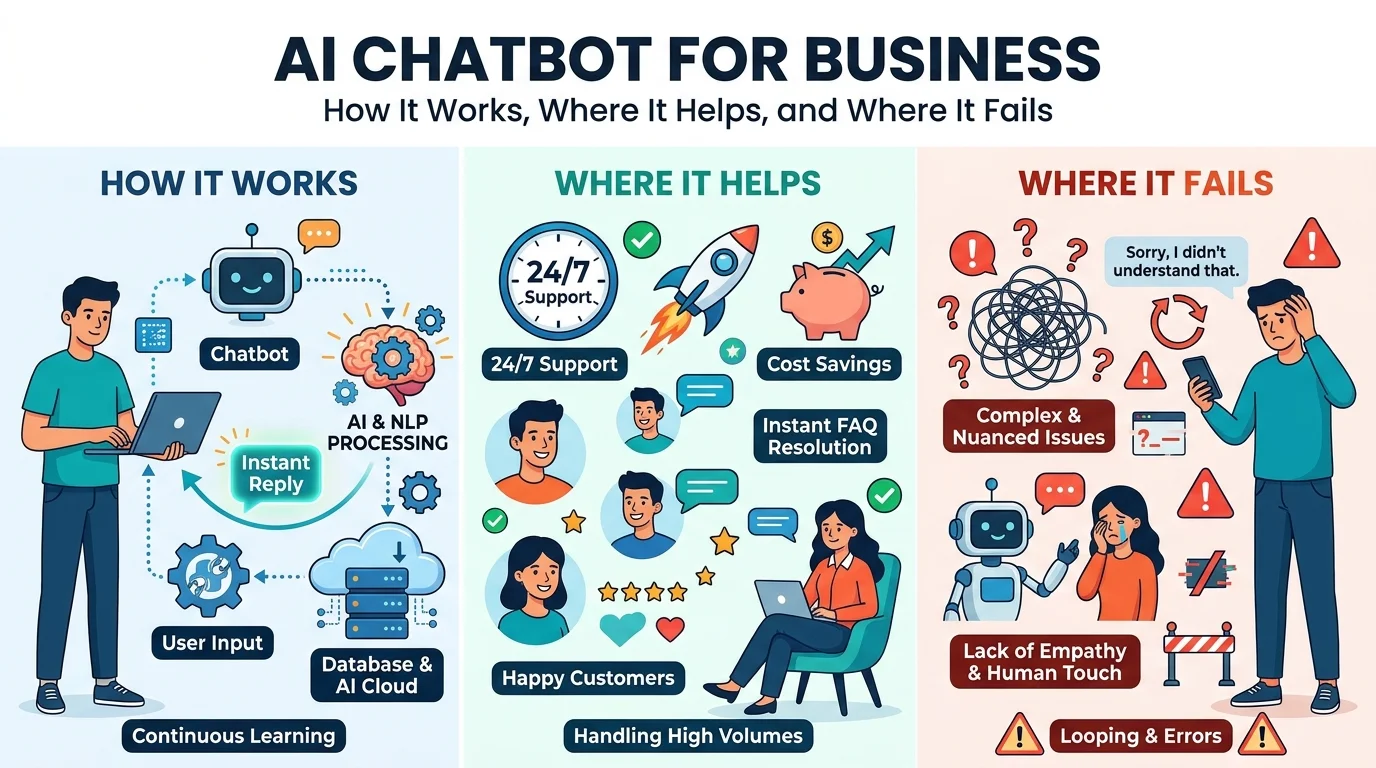
AI Chatbot for Business: How It Works, Where It Helps, and Where It Fails
An AI chatbot for business is software that talks with customers, leads, or employees in natural language, understands what they are asking, and answers or acts on it using your company’s own information. It usually lives on a website, in WhatsApp or Messenger, or inside an internal tool, and it connects to systems such as a CRM, a calendar, or an order database so it can do more than chat.
Older chatbots followed fixed scripts. If a visitor typed something the script didn’t expect, the bot failed. Modern bots use large language models (LLMs) to read intent, plus a retrieval step that pulls answers from approved documents, so they handle messy, real-world questions much better. They can also be wrong, confident, and off-brand, which is why a working setup needs boundaries, a knowledge base, and a clear route to a human.
Most pages that rank for this topic are vendor pages that list benefits and push a product. They rarely explain what happens behind the reply, when a bot should hand a chat to a person, how to protect customer data, or how to measure whether the bot earns its keep. This guide covers those gaps.
You will learn what an AI chatbot for business is made of, the four main types, where it creates value, where it breaks, how to plan a launch, how to handle privacy, which numbers to track, and the mistakes that sink most projects.
What an AI Chatbot Actually Is
Think of a chatbot as four parts working together:
- A channel. The place the conversation happens, such as your website widget, WhatsApp, Messenger, or an internal Slack workspace.
- A language model. The part that reads the message, works out intent, and writes a reply in plain language.
- A knowledge source. Your FAQs, policies, product pages, and help documents. This is what keeps answers tied to facts you approved.
- Connections to your tools. APIs and webhooks that let the bot check an order, create a CRM record, or book a calendar slot.
A bot with only the first two parts is a general chat window. It sounds smart but knows nothing about your business. Adding the knowledge source makes it useful, and adding tool connections makes it productive.
How an AI Chatbot Works Step by Step
When a visitor sends a message, most business bots follow a similar path:
- Input. The message arrives as text or as a transcribed voice note.
- Cleanup. The system fixes spelling and shorthand so the meaning is clear.
- Intent and details. The bot identifies what the person wants (pricing, booking, a refund) and picks out details such as dates, product names, or an order number.
- Context. It checks earlier messages in the same chat so follow-up questions make sense.
- Retrieval. It searches your knowledge base for passages related to the question. This step is called retrieval-augmented generation (RAG). The bot passes those passages to the model so the reply is grounded in your approved content.
- Action or answer. The bot either writes a reply, asks a clarifying question, calls a tool, or hands the chat to a person.
- Safety checks. Rules and confidence thresholds decide whether the answer is safe to send.
The retrieval step is the biggest difference between a toy and a business tool. Without it, the model fills gaps from general training data and may invent a refund policy that doesn’t exist.
Four Types of Chatbots and When Each Fits
| Type | How it answers | Best for | Main trade-off |
|---|---|---|---|
| Rule-based | Fixed if-then menus | Simple FAQs, appointment menus | Rigid and breaks on unexpected input |
| Retrieval-based | Picks from prewritten approved answers | Support content with strict wording | Limited flexibility |
| Generative | Writes new replies with an LLM | Open-ended questions | Can state wrong things confidently |
| Hybrid | Combines rules, retrieval, and generation | Most business use | More design work up front |
For most companies, a hybrid design is the practical choice. Rules handle the predictable steps (collect a name, confirm a time slot), retrieval supplies facts, and the language model handles the conversation between those steps.
Where an AI Chatbot for Business Creates Value
A chatbot pays off when the work is frequent, repetitive, and answerable from information you already have.
Lead qualification. A bot can ask a visitor a few questions, such as what they need, their timeline, and their budget range, then pass qualified leads to your sales team with the answers attached. Our guide on how to automate lead generation with AI shows how this fits into a wider pipeline.
Customer support. Order status, opening hours, shipping rules, return policies, and password help make up a large share of tickets in many businesses. A bot answers these instantly, at any hour, and leaves your team for the harder cases.
Appointment booking. The bot checks a calendar, offers open slots, confirms the booking, and sends a reminder. This works well for clinics, salons, agencies, and consultants.
If you want a longer list of work that suits automation, see our breakdown of 15 tasks to automate with AI in your business.
Where AI Chatbots Fail
Knowing the failure modes of an AI chatbot for business matters more than knowing the features. Plan for these:
- Hallucination. A model can produce a fluent answer that is wrong. Grounding replies in your documents and instructing the bot to say “I don’t know” reduces this, but doesn’t remove it.
- Stale information. If your pricing page changed last month and the knowledge base didn’t, the bot repeats the old answer. Someone must own updates.
- Vague questions. “Can you help me?” leaves the bot with little to work with. Good bots ask a clarifying question instead of guessing.
- Tone drift. Without style rules, a bot may sound casual, stiff, or inconsistent with your brand.
- Edge cases and emotion. Angry customers, complaints, and legal or medical questions need a person.
- Prompt manipulation. Users can try to trick a bot into ignoring its instructions or revealing internal text. Limit what the bot can access and do, and test with adversarial prompts before launch.
None of these is a reason to avoid a bot. They are reasons to set its job narrowly and test it hard.
When a Chatbot Should Hand Over to a Human
Handoff rules are the most overlooked part of an AI chatbot for business. Define them before launch:
- The visitor asks for a person, even once.
- The bot fails to understand the same request twice in a row.
- The message contains complaint language, a refund dispute, or a legal or safety concern.
- The conversation involves a high-value deal or an existing key account.
- The question touches regulated advice (medical, legal, financial).
A good handoff passes the full chat history and the details already collected, so the customer never repeats themselves. A poor handoff drops the visitor into a generic inbox with no context, which is worse than having no bot at all.
How to Plan an AI Chatbot Project
Follow these steps in order:
- Choose one job. Pick a single measurable goal such as “qualify website leads” or “answer order-status questions.” A bot that tries to do everything does nothing well.
- Collect the source material. Gather FAQs, policies, product details, and sample past conversations. Remove outdated or conflicting documents.
- Map the conversation. Decide the greeting, the questions the bot asks, the actions it can take, and where it stops.
- Pick the channel. Start where your customers already are: your website, WhatsApp, or Messenger.
- Connect your tools. Link the CRM, calendar, e-commerce platform, or help desk through APIs or an automation platform. Our comparison of n8n, Zapier, and Make helps you choose the connector layer.
- Test with real questions. Run at least a few dozen real customer questions, including awkward ones, and review every answer.
- Launch small. Release it to a portion of traffic or a single page first, then expand.
- Review weekly. Read chat logs, fix wrong answers, and add missing content.
If you are unsure whether you need a chatbot, a simple workflow, or something more autonomous, read about AI agents vs workflow automation first. For the broader picture, our guide to AI workflow automation for business explains where a chatbot sits among other automations.
Privacy and Data Handling
Customers type personal details into chat windows, so treat the bot as part of your data system, not a toy on the side.
- Say it’s a bot. Tell visitors they are talking to an automated assistant.
- Collect only what you need. Don’t ask for details the job doesn’t require.
- Control retention. Decide how long chat logs are stored and who can read them.
- Keep sensitive data out. Instruct the bot not to request payment card numbers, passwords, or health details in chat.
- Check the vendor terms. Confirm whether your conversations are used to train third-party models, and where data is stored.
- Follow local law. Rules such as GDPR in Europe or HIPAA for U.S. health data may apply depending on your customers and industry. This isn’t legal advice, so confirm requirements with a qualified adviser.
How to Measure Whether the Bot Works
A bot that “feels helpful” isn’t proof. Track a small set of numbers:
| Metric | What it tells you |
|---|---|
| Resolution rate | Share of chats solved without a human |
| Handoff rate | How often the bot escalates, and why |
| Lead conversion | Chats that became booked calls or qualified leads |
| Response time | Speed of first reply versus your old process |
| Customer satisfaction | A simple thumbs up or down at the end of a chat |
| Wrong answer rate | Answers flagged as incorrect in weekly reviews |
Set a baseline before launch, such as current response time and weekly ticket volume, so you can compare. Read a sample of chats every week. Numbers show what happened, and transcripts show why.
How Nexstair Can Help
Nexstair builds chatbots and conversational AI for websites and messaging platforms as part of its AI automation work. These bots qualify leads, answer common questions, book appointments, and pass the right conversations to a person. Projects follow a clear process: discovery of your current workflows, design of the conversation and its connections, build and testing, launch, and ongoing monitoring. The team connects bots to tools such as HubSpot, Salesforce, Google Workspace, WooCommerce, and WordPress, with n8n as the main automation platform.
If you would like to explore whether an AI chatbot for business fits your sales or support process, you can talk to our team and we will map one use case with you first.
Frequently Asked Questions
What is an AI chatbot for business?
An AI chatbot for business is software that understands customer questions in natural language and replies using your company’s approved information. It can also take actions such as booking a call or creating a CRM record.
How is an AI chatbot different from a rule-based chatbot?
A rule-based chatbot follows fixed scripts, while an AI chatbot interprets the meaning of a message and writes a fitting reply. Rule-based bots break on unexpected wording, and AI bots handle it better but need guardrails.
Is an AI chatbot the same as ChatGPT?
No, a general chat tool answers from broad training data, while a business chatbot is connected to your documents, rules, and systems. That connection is what makes answers specific and accountable.
Can an AI chatbot replace my support team?
It can handle repetitive questions, but it shouldn’t replace people for complaints, complex cases, or sensitive topics. The best setups let the bot take routine work and route the rest to staff.
What can an AI chatbot do for lead generation?
It can ask qualifying questions, answer objections, book calls, and send lead details to your CRM. This works best when the bot has clear criteria for what counts as a qualified lead.
Do AI chatbots make mistakes?
Yes, they can give wrong or outdated answers, especially without a maintained knowledge base. Grounding replies in approved documents, setting a fallback, and reviewing chats weekly keep errors low.
Is an AI chatbot safe for customer data?
It can be, if you collect only necessary data, limit retention, and check how your vendor stores and uses chats. Keep payment and sensitive health details out of the conversation.
The Bottom Line
An AI chatbot for business works when it has one clear job, a clean knowledge base, connections to your tools, and a quick route to a person. Pick a single use case, test it against real questions, protect customer data, and measure outcomes such as booked calls and solved tickets instead of chat counts. Start narrow, review the transcripts every week, and expand only after the first use case proves itself.
Recent Posts
Related Posts
An AI chatbot for business is software that talks with customers, leads, or employees in natural language, understands what they...
If you sell to other businesses, LinkedIn is where your buyers already spend time. Decision makers scroll their feeds between...

SEO for real estate agents is the process of improving a website and online profiles so they appear in Google...
AI search is rewriting how people find answers. Learn how AI Search Is Changing Keyword Research , what to track...

Running an online store is about more than adding products and waiting for customers to find them. With thousands of...