
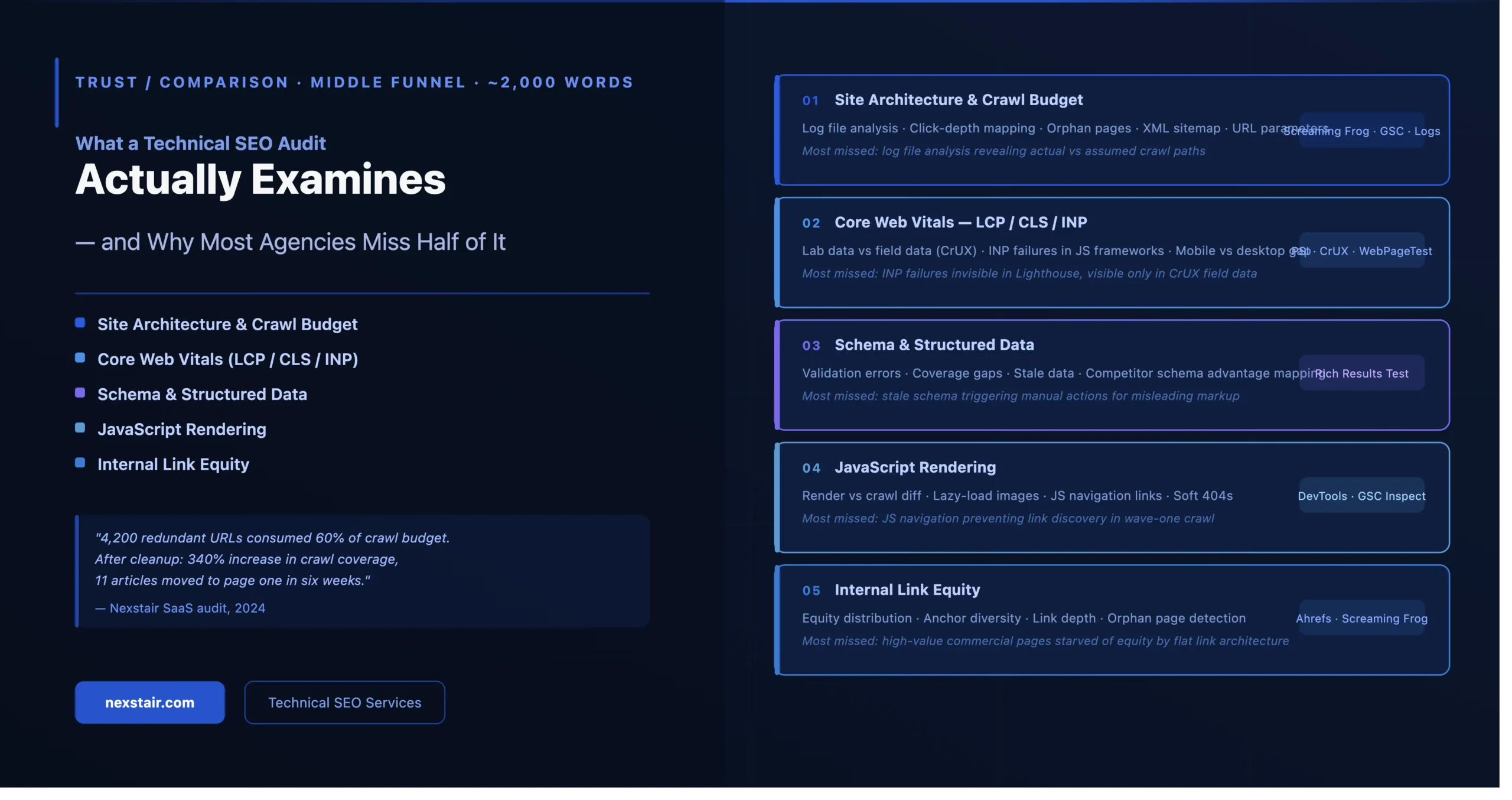
What a Technical SEO Audit Actually Examines and Why Most Agencies Miss Half of It?
A technical SEO audit is one of the first things any reputable agency should offer — and one of the most misunderstood deliverables in the industry. When a prospect asks “what does your audit cover?”, the answer they get reveals almost everything about what that agency actually knows. A one-page report ticking off meta tag lengths and broken links isn’t a technical audit. It’s a surface-level crawl dressed up with a price tag.
This post explains what a thorough technical audit actually examines across five domains — and specifically calls out the areas that most generalist agencies skip entirely. If you’re evaluating agencies right now, the checklist here gives you a direct way to test the depth of what you’re being offered.
In a 2024 audit of a B2B SaaS website that had already been “audited” by two previous agencies, Nexstair identified 14,000 JavaScript-rendered URLs that were invisible to Google’s crawler. Neither previous audit had checked JavaScript rendering. The site had been running paid search to fill a gap that a crawler issue — not a content problem, not a budget problem — was causing in organic visibility. Fixing the rendering configuration cost nothing. The twelve months of paid search spend covering for it cost substantially more.
Before the deep dive, here is how a thorough audit compares to what most agencies deliver:
| Audit area | Typical agency | Thorough audit |
| Crawl budget & log file analysis | ✗ Most agencies skip | ✓ Nexstair standard |
| Core Web Vitals (LCP, CLS, INP) | ✓ Usually included | ✓ Nexstair standard |
| JavaScript rendering check | ✗ Often missed | ✓ Nexstair standard |
| Canonical tag audit | ~ Partial | ✓ Full audit |
| Schema & structured data | ✗ Often skipped | ✓ Nexstair standard |
| Internal link equity mapping | ✗ Rarely done | ✓ Nexstair standard |
| Orphan page identification | ✗ Rarely done | ✓ Nexstair standard |
| Faceted navigation review | ✗ Often missed | ✓ Nexstair standard |
| Hreflang (multilingual sites) | ~ If prompted | ✓ Proactive check |
Site Architecture & Crawl Budget
Crawl budget is the number of URLs Googlebot will crawl on your site within a given time period. For small sites with a few hundred pages it’s rarely an issue. For e-commerce stores, news sites, or platforms with dynamic URL generation — faceted navigation, session parameters, filtered search results — it becomes one of the most consequential technical issues on the site.
Most agencies audit a site’s URL structure by running it through a crawler like Screaming Frog or Sitebulb and reviewing what comes back. This is useful but incomplete. A proper crawl budget audit also includes:
- Log file analysis: server logs show exactly which URLs Googlebot actually visited, how frequently, and whether it’s wasting crawl budget on non-canonical, faceted, or parameter-generated URLs that should never be indexed. This is the most reliable signal available about how Google actually interacts with your site — and most agencies never look at it because it requires requesting raw server logs from the client and processing them with specialist tooling.
- Render budget: separate from crawl budget, render budget is the resource Googlebot allocates to executing JavaScript. If your site is JS-heavy, pages may be crawled but not rendered — meaning their content is invisible to the index.
- Orphan page identification: pages that exist on the site but have no internal links pointing to them are effectively invisible to crawlers. They may have been live for years without ever being indexed, or they may have once been accessible but lost their links in a redesign.
What good looks like
A thorough architecture audit maps the relationship between crawl budget allocation and the commercial value of your pages. The goal is not simply to reduce the number of crawled URLs — it’s to ensure that Googlebot’s visits are concentrated on the pages that matter most: product pages, category pages, key service pages, and any content you actually want ranking.
Canonical tags sit within this domain. A canonical audit isn’t just checking that canonical tags are present — it’s checking that they’re pointing to the right URLs, that they’re consistent between the HTML and the sitemap, that paginated pages are handled correctly, and that no canonical chain loops back on itself or points to a redirected URL.
Core Web Vitals (LCP / CLS / INP)
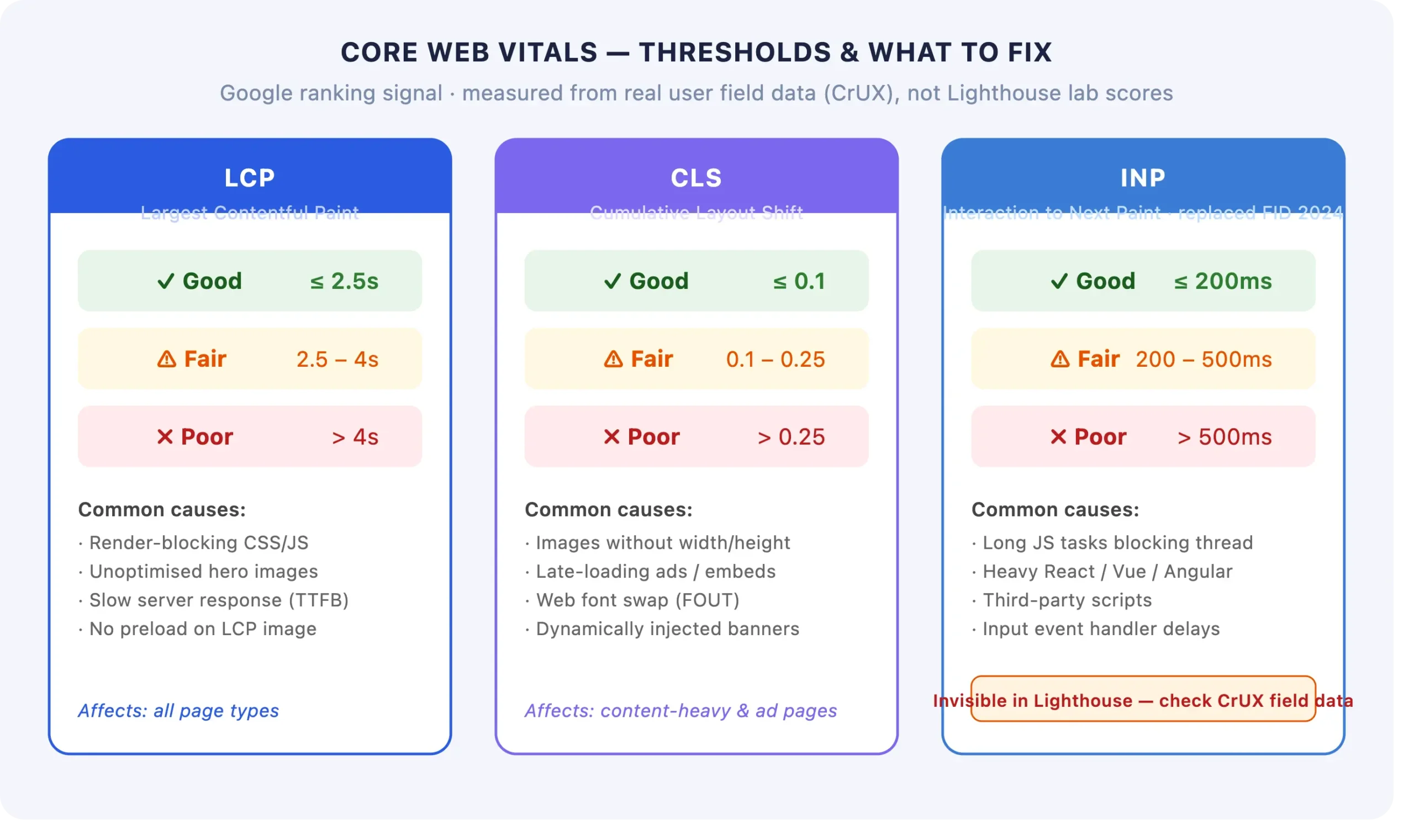
Core Web Vitals became a confirmed Google ranking factor in 2021, and the signal set has evolved since: INP (Interaction to Next Paint) replaced FID (First Input Delay) as the interactivity metric in March 2024. This is one of the first places to check whether an audit was produced recently or whether you’re being shown a recycled report — any technical audit that still references FID rather than INP is at least a year out of date.
The three metrics and what actually moves them
- LCP (Largest Contentful Paint): measures how long it takes for the largest visible element — usually a hero image or above-the-fold heading — to render. Common causes of poor LCP: unoptimised images, render-blocking resources, slow server response times, no CDN, lazy-loading applied to above-the-fold elements. A proper audit identifies the LCP element on key page templates and traces the specific bottlenecks in its load path.
- CLS (Cumulative Layout Shift): measures how much the page layout shifts during loading. The most common culprits are images without explicit width and height attributes, ads or embeds that load and push content down, and web fonts that cause text reflow. CLS is often invisible during manual testing but measurable in field data — a good audit uses CrUX (Chrome User Experience Report) data, not just synthetic lab scores.
- INP (Interaction to Next Paint): measures responsiveness to user input — how quickly the page responds when a user clicks, taps, or types. Poor INP is almost always a JavaScript problem: long tasks on the main thread blocking the browser’s ability to respond. Third-party scripts are a common cause and are frequently overlooked because they’re not visible in first-party performance audits.
CWV field data and lab data frequently disagree. A site that scores well in Lighthouse (a synthetic lab tool) can still fail CWV thresholds in real-user data because the lab environment doesn’t replicate actual device and network conditions. Any audit that only reports Lighthouse scores without comparing to Search Console’s Core Web Vitals report or CrUX data is telling an incomplete story.
Schema & Structured Data
Schema markup tells search engines explicitly what your content means — not just what it says. The practical value for most sites comes from four types: Article schema on blog content, Product schema on e-commerce pages, FAQPage schema on relevant educational content, and LocalBusiness schema for sites with physical locations.
A schema audit has two layers. The first is checking whether schema exists and whether it’s technically valid — no missing required fields, no invalid property types, no conflicts between the JSON-LD and the visible page content. The second, and less commonly examined, layer is checking whether the schema that exists is actually being used effectively: is the correct type selected, are all eligible properties populated, are there rich result opportunities being left unrealised?
What most agencies miss in schema audits
- Coverage gaps: schema implemented on some page templates but not others. A blog that has Article schema on posts published in the last six months but not on older content — or Product schema on featured products but not the full catalogue — has an inconsistent implementation that limits rich result eligibility.
- Stale or inaccurate data: Product schema with out-of-date pricing, Review schema with aggregate ratings that don’t match the page’s visible review content, or LocalBusiness schema with an old phone number. Invalid data can result in manual actions from Google in addition to lost rich result eligibility.
- Missed entity relationships: for sites with clear organisational or topical structure, breadcrumb schema and sitelinks searchbox schema are commonly overlooked opportunities to communicate hierarchy and structure directly to Google.
Schema validation should always be run through Google’s Rich Results Test and the Schema.org validator — not just Screaming Frog’s structured data extraction, which catches errors in the data but can’t evaluate rich result eligibility.
JavaScript Rendering
This is the single most commonly skipped area in technical audits — and, for sites built on React, Vue, Angular, or Next.js, often the most consequential.
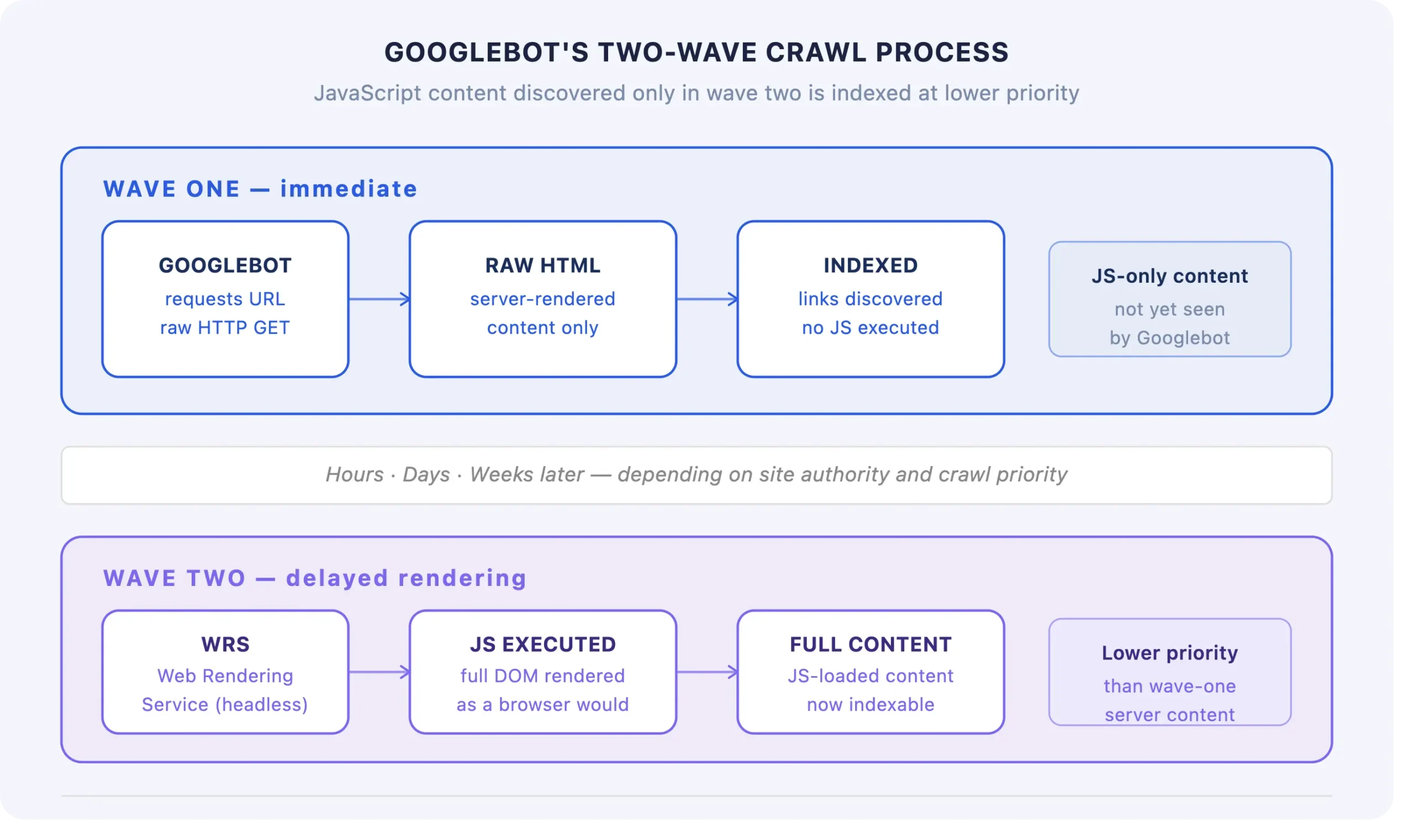
Google crawls pages in two stages: first a fast, lightweight crawl that processes HTML; second a slower render that executes JavaScript. The gap between these two stages — sometimes weeks for lower-priority pages — means that content rendered by JavaScript may not be indexed promptly, or at all, depending on how the site is built and how Googlebot’s render queue is managing that domain.
The checks a JS rendering audit includes
- Raw HTML vs rendered HTML comparison: fetch the page as Googlebot would see it without JavaScript execution, and compare it to the fully rendered version. Any content that exists only in the rendered version is potentially invisible to the index — or at best, delayed.
- Internal links in JS: if your site’s navigation, breadcrumb trail, or internal links are injected by JavaScript, they may not be followed in the first crawl pass. This directly impacts crawl budget, internal link equity distribution, and the speed at which new pages get discovered and indexed.
- Core content visibility: the most critical check: is your primary content — H1, body copy, product descriptions, prices — present in the raw HTML, or is it only available after JavaScript execution? Content that only exists post-render is at risk.
- Structured data in JS: JSON-LD blocks injected by JavaScript after page load may not be reliably processed. The safest implementation is always JSON-LD in the static HTML response.
If your site is built on a modern JavaScript framework and your agency’s last audit didn’t include a JavaScript rendering check, it’s worth re-examining what that audit actually delivered. Our technical seo services include JavaScript rendering analysis on every project — not as an add-on, but as a standard component of the crawl audit.
Internal Link Equity
Internal link equity — sometimes called “PageRank” in its original academic form — is the flow of authority from one page to another through hyperlinks. External backlinks bring authority into your site. Internal links distribute that authority across your pages. A site with strong backlinks but poor internal linking will have authority pooled at its homepage and a handful of top-level pages, while the pages that most need to rank — product pages, category pages, service pages — remain underserved.
What a proper internal link audit examines
- Link equity distribution: which pages are receiving the most internal links? Does this match the commercial priority of those pages? In most sites, the answer is no — blog posts link to each other, but not to service pages; the homepage links to the blog but not to individual product categories.
- Orphan pages: pages with zero internal links pointing to them. These exist in the sitemap and may be technically crawlable but receive no authority from the rest of the site. For e-commerce sites running thousands of product pages, orphan detection at scale requires specialist tooling beyond a standard crawl.
- Link depth from homepage: any commercially important page more than three clicks from the homepage is likely underperforming its potential. A proper audit maps click depth against page value and flags mismatches.
- Anchor text distribution: over-optimised internal anchor text (the same keyword repeated across every link to a page) is a less-discussed risk. Under-optimised anchor text (generic “click here” or “learn more”) wastes the relevance signal that internal links carry.
For any business looking for genuine seo consulting services — not just a crawl report — internal link architecture should be a primary deliverable, not a footnote. The difference between a site where authority flows efficiently to the right pages and one where it doesn’t is often the difference between page one and page three for core terms.
Frequently Asked Questions
| How long does a full technical SEO audit take? |
| For a small site (under 500 pages), a thorough audit typically takes 2-3 business days. For a medium site (500-10,000 pages), expect 5-7 days. For large e-commerce or enterprise sites (10,000+ pages), a proper audit including log file analysis, JavaScript rendering checks, and internal link mapping can take two to three weeks. Any agency delivering a “full” audit for a complex site within 24-48 hours is almost certainly running an automated crawl and repackaging the output rather than performing genuine analysis. |
| What is crawl budget and why does it affect rankings? |
| Crawl budget is the number of URLs Googlebot will crawl on your site within a given time period, determined by your site’s crawl health and Google’s crawl capacity allocation. If your site generates more URLs than Google is willing to crawl — through faceted navigation, parameter-generated pages, or duplicate content — Google will spend crawl budget on low-value pages instead of your important content. This means new pages get indexed slowly, updated content isn’t re-crawled promptly, and important pages may be crawled less frequently than they should be. |
| How do Core Web Vitals directly impact search rankings in 2026? |
| Core Web Vitals (LCP, CLS, and INP since March 2024) are a confirmed ranking signal, but Google has consistently indicated they function as a tiebreaker rather than a primary ranking driver. A site with poor CWV and strong content will usually outrank a site with perfect CWV and weak content. However, for sites competing in tight SERPs where content quality is comparable, CWV performance is a meaningful differentiator — and poor CWV scores also directly impact conversion rate, which compounds the organic traffic problem. |
| What tools are used in a professional technical SEO audit? |
| A thorough audit typically combines: Screaming Frog or Sitebulb for crawl analysis; Google Search Console for index coverage, CWV field data, and manual action checks; server log analysis tools (Screaming Frog Log Analyser, Botify) for crawl behaviour; Chrome DevTools and Google’s URL Inspection Tool for JavaScript rendering; PageSpeed Insights and CrUX for performance data; and Schema.org validator and Google’s Rich Results Test for structured data. No single tool covers all domains — agencies that rely on one platform’s audit feature are almost certainly missing significant areas. |
| How often should a technical SEO audit be repeated? |
| A full technical audit should be repeated annually at minimum for stable sites, and quarterly for sites undergoing active development, CMS migrations, or significant content expansion. A lighter ongoing technical monitoring cadence — checking Search Console for new errors, crawl anomalies, and CWV regressions monthly — should run continuously between full audits. The most common mistake is treating a technical audit as a one-time exercise: technical debt accumulates continuously through development changes, third-party script additions, and platform updates. |
What to Ask Any Agency Before You Commission an Audit
The five domains covered in this post — site architecture and crawl budget, Core Web Vitals, schema and structured data, JavaScript rendering, and internal link equity — represent the minimum scope of a legitimate technical SEO audit. Before signing anything, ask the agency you’re evaluating three direct questions:
- Do you include log file analysis as a standard part of the audit, or is it an optional add-on?
- How do you check JavaScript rendering, and what do you do if the site is a React or Next.js application?
- Does the audit include an internal link equity map, or just a list of orphan pages?
The answers — and the confidence with which they’re given — tell you more about what you’ll actually receive than any proposal document will.
Recent Posts
Related Posts
Are AI Web Crawlers Indexing Your Site Correctly?
For years, web developers have relied on JavaScript to power the modern internet, operating under the assumption that search engines...
How to Choose the Right CMS for Your Business Website
Choosing a CMS for business use is an architectural decision, not a design decision, even though most business owners approach...

How to Manage Social Media Marketing for Small Business
Learn how to manage social media marketing for small business effectively & proven strategies, planning tips, and tools to grow...

How Much Does a Custom Website Cost in 2026
Ask five agencies what a custom website costs and you’ll get five different numbers, and none of them will be...

Shopify vs WooCommerce: Choosing the Right Ecommerce Platform
Choosing an eCommerce platform is one of those silent factors that can impact your monthly costs, your developers' pain,...